 BOHEMIAPC počítačeNačítám kategorie
 Notebooky a UltrabookyNačítám kategorie
 Mobilní telefony a tabletyNačítám kategorie
 Chytrá domácnostNačítám kategorie
 Herní zónaNačítám kategorie
- Konfigurátor sestav
RICOH MEETING 360 V2 3-in-1, 360° P-n-P Conference Cam/Mic/Speaker, 1920x1080, 3.6m/6m Video/Audio



https://www.pfu-emea.ricoh.com/en-gb/hardware/meeting-devices/360-meeting-hub
Makes remote meetings feel more inclusive, immersive and seamless.
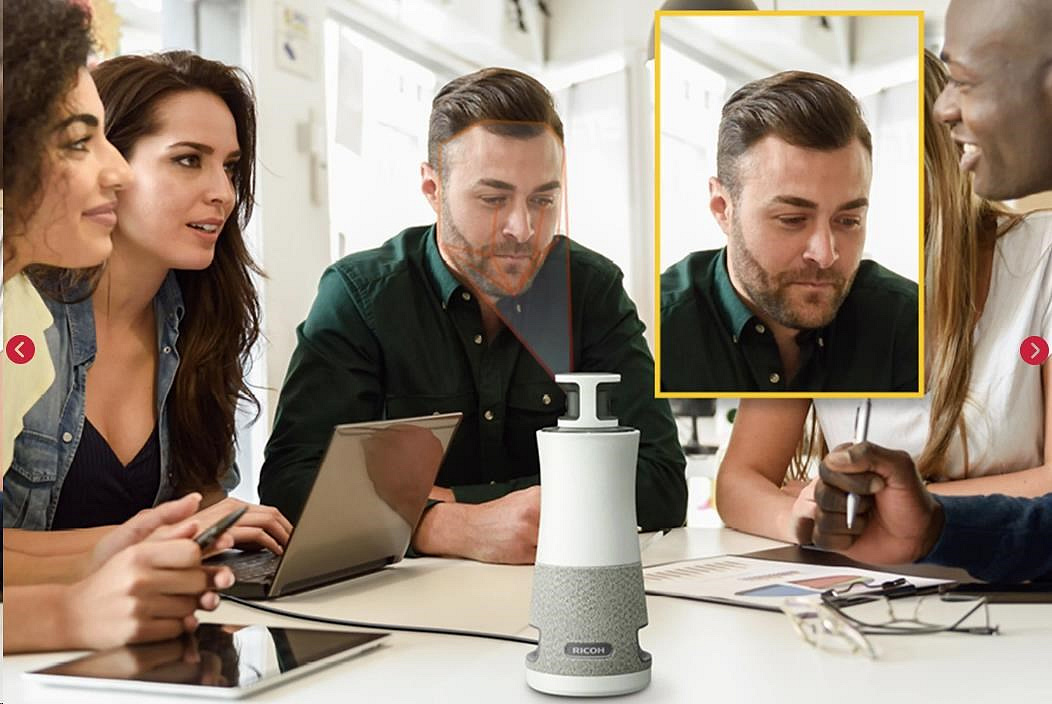
The RICOH 360 Meeting Hub is a 3-in-1 360 camera, speaker and microphone that makes remote and in-person meeting attendees feel like they’re together in the same place.
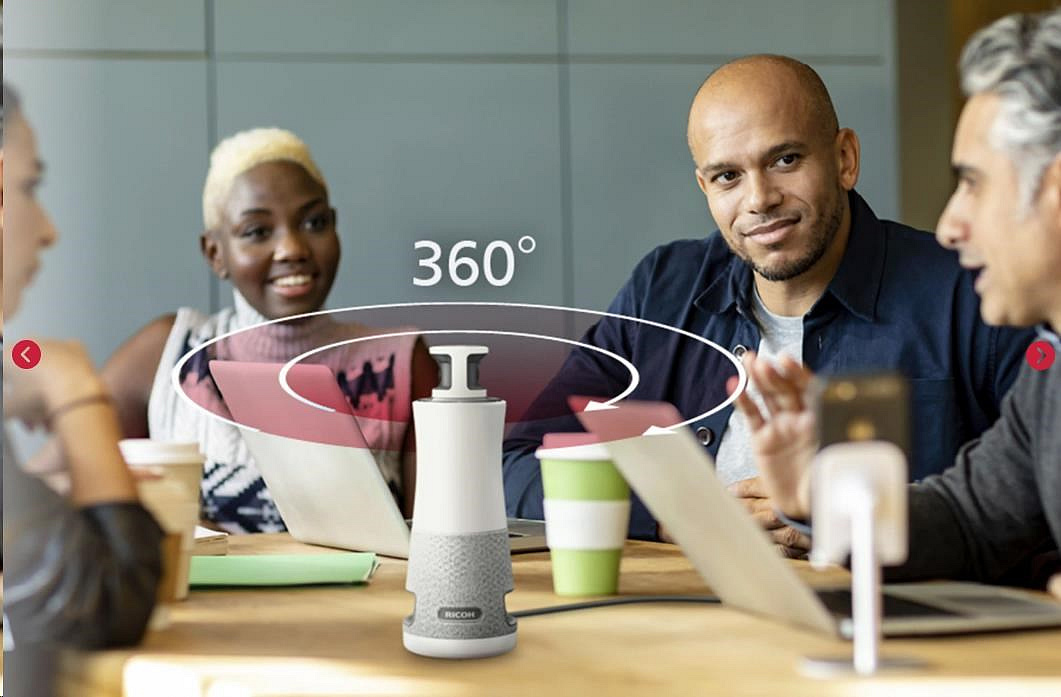
Remote working has many benefits but for many, video conferences can be a bit of an issue. People feel unconnected as a group and a conference room webcam can let you down. Well, not with our 360 Meeting Hub. In fact, its panoramic 360-degree camera and superior voice pick up (from up to 6 metres away) mean everyone can be seen and heard.
Entire groups are displayed simultaneously, so no one appears distant, and individuals attending remotely can see and hear everyone as if they were there in person. The camera automatically focuses on those speaking and adjusts the image so facial expressions are clear – even up to 3.6 meters away. In addition, Auto Gain Control functionality adjusts the volume so that all participants can be heard equally, and interactions can flow seamlessly.
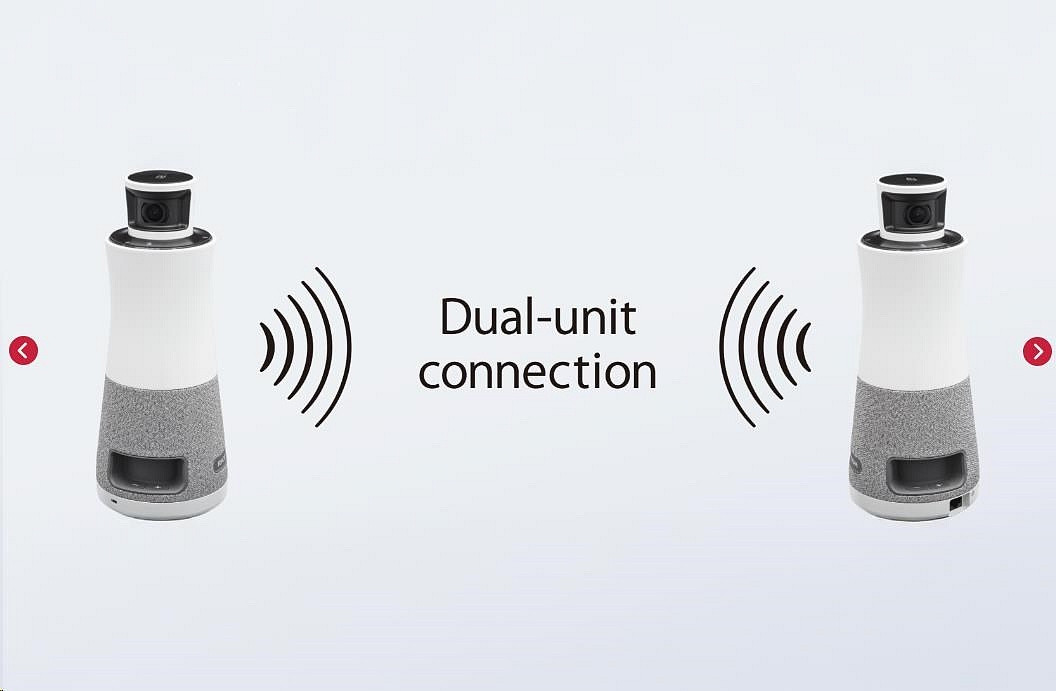
Thanks to its dual fisheye lens, the device can identify up to 8 individual speakers, and highlight the three most recent participants in high-resolution, larger frames. For larger meetings, two units can be connected together. Whilst acoustic echo cancellation and noise reduction ensure all participants can be heard clearly – even in places with background noise.
Set-up and operation are stress-free and seamless – intuitive plug-and-play functionality means you simply plug the RICOH 360 Meeting Hub into a laptop with no need to configure multiple devices or install complicated software. And for larger meetings, just pair two units together wirelessly.
Read our case study and see how the RICOH 360 Meeting Hub boosts productivity and engagement at BCC Castelli Romani Bank.
| RICOH 360 Meeting Hub | |||
|---|---|---|---|
| Model Name | RICOH Meeting 360 V2 | ||
| Camera | Field of view (FOV) | Horizontal: 360°, Vertical: 42±2° | |
| Image sensor | 12M x 2 | ||
| Output resolution*1 | 1920 x 1080, 1280 x 720 | ||
| Frame rate*2 | 30 fps, 10 fps, 24 fps | ||
| Video range | 3.6m | ||
| Image processing | Auto White Balance, Auto Exposure, Anti-Flicker, LTM (Local Tone Mapping), Dewarping, Stitch, Cropping, Zoom (Scaler) | ||
| Microphone | Method | Three-microphone array | |
| Directivity | 360° | ||
| Audio pickup range | 6.0m | ||
| Audio processing | Mute, Auto Gain Control, Noise Reduction, Echo Cancellation | ||
| Speaker | Wattage x Number of speakers | 8 W x 3 | |
| Directivity | 360° | ||
| Sound Pressure Level (SPL) | Power supply from AC adapter | 91 dB (1 m) | |
| Power supply from PC via USB Type-C cable | 81 dB (1 m) | ||
| Network*3 | Ethernet | 10BASE-T, 100BASE-TX, 1000BASE-T | |
| Wireless LAN | 802.11a/b/g/n/ac/ax | ||
| Screen display | Layout | 1. 360° panoramic image & Auto-focused speakers image (up to 3 speakers) [Default] | |
| 360° Panoramic image on/off | Supported*6 | ||
| Size | Dimensions (W x D x H) | 110.2 x 110.2 x 272.6 (mm) / 4.34 x 4.34 x 10.73 (inches) | |
| Weight | 1129 g / 2.49 lb | ||
| Interface | USB Type-C port | 2 ports (USB 2.0, USB 3.1, PD 3.0) | |
| Ethernet port*7 | RJ-45 x 1 port | ||
| Kensington security slot | Standard slot (3 mm x 7 mm) x 1 slot | ||
| USB power delivery | Power supply from AC adapter | DC20 V / 2.25 A (max), AC100-240 V 50-60 Hz 1.7 A | |
| Power supply from PC via USB Type-C cable | DC5 / 3 A (max) | ||
| Power consumption*8 | Power supply from AC adapter | 45 W | |
| Power supply from PC via USB Type-C cable | 15 W | ||
| Environmental condition | Temperature | 10-32°C | |
| Humidity | 15-80% (No condensation) | ||
| Operating environment | Supported OS | Windows 11 (64bit) / / macOS 12 Monterey / macOS 13 Ventura / macOS 14 Sonoma (MacBook Air, MacBook Pro)*9 | |
| Operation-checked video conferencing platforms | Microsoft Teams / Zoom*10 / Cisco Webex® / Google Meet™ | ||
| Accessories | AC adapter 45 W (20 V 2.25 A), AC power plug, USB 3.1/2.0 m/3 A cable (Type-C to C) x 2, Warranty URL, Read This First, Quick Guide | ||
| Tripod screw thread | 1/4 inch tripod screw hole at the bottom | ||
| Standard warranty period | 3 years | ||
*1Frame rate is automatically switched depending on the speed of the web conference application in use
*2With AC adapter: 30 fps / With power supply via PC: 10 fps / When using Dual-unit connection: 24 fps
*3Network is used only on the occasion of firmware update
*4Pin Screen can be set in the RICOH Meeting 360 Apps
*5Available only when using Dual-unit connection
*6360° Panoramic image can be turned on and off by long-pressing the top of the unit, or in the RICOH Meeting 360 Apps
*7Network is used only on the occasion of firmware update
*8In case PC is compatible with USB power delivery (PD)
*9macOS is supported from the Firmware Version 0002.0001.0000.0021
*10Zoom Rooms Certified
Free Software / Downloadable software
| Product name | RICOH Meeting 360 Apps for Windows / RICOH Meeting 360 Apps for Mac | |
|---|---|---|
| Compatible OS | Windows 11 (64bit) / macOS 12 Monterey / macOS 13 Ventura / macOS 14 Sonoma (MacBook Air, MacBook Pro) | |
Package contents
- RICOH Meeting 360 V2
- AC adapter
- USB cable (Type-C to C) x 2
- Type-C AC power plug
- Type-BF AC power plug
- Warranty URL sheet
- Read This First
- Quick Guide
.